Posts

vSphere 6 Hardening Guide Release

With the release of vSphere 6.0 in Mar, the hardening guide is finally announced release today.  There is some different approach via vSphere API which is used in this release to help audit or implement using the guide. You can also bookmark this page for all the other version vSphere hardening guide.

vExpert 2015 Second Half Announcement

Here I like congrats all new vExpert 2015 with the second half results announced 1 week before VMworld 2015.  Results can be viewed here . If you are going to VMWorld this year, remember to grab all the freebies for vExpert as well as the meetup just for vExpert. If you miss the application, look out for the application for vExpert 2016 likely end of this year.

Is VMware vCloud Suite Bundle Becoming Irrelevant?

Software Defined Data Center (SDDC) is a term often used to illustrate the light of abilities to management and monitor your one or multiple data centers whether it is a private, managed or public cloud environment or mixed of anything.  With the ability to also having a centralize platform and ability to automate certain daily operation tasks to create an agile and efficient IT infrastructture.  Instead of having different silos creating the same overheads that once appear when everything was in a physical infrastructure where each applications could still be using a specific hardware set. In the past, VMware introduced the vCloud Suite to allows customer to build their own cloud.  However with the adoption of mutliple clouds, VMware came up with another bundle. VMware introduced the vRealize Suite (vR Suite) in both Advanced and Enterprise last year and this comprises of vRealize Operations Suite, Log Insight, vRealize Automation and vRealize Business all in one bun...

vSphere 6.0 Web Client Integration Plug-in Bug Fix

Image
So the new vSphere 6.0 has release, what is great on one of the functionality is the web client.  It has always be crawling since it was introduced in vSphere 5.0.  In vSphere 6.0, it was promised with great performance improvement and it was great! On day 0 daily operations activity, accessing the VM console is essential and often used.  When you launch the vSphere Web Client, you will be at the login page.  Below you will see the link to download the Client Integration Plug-in as shown below: After installing, you will be able to access the VM console after logging in.  Upon login, you will see the screen below when a VM is selected: Above you see the screenshot taken from Hands-on-Lab.  To access a VM console you will have selected the VM and on the right you will see the above.  Clicking on "Launch Console", will launch the VM console in a new tab\window of your browser.  However this link is invalid!  So how are you going to ...

VMware vRealize Operations (vR Ops) Requirements

Image
Decided to fill up the missing information which was not listed in the documentation of vRealize Operations neither was it stated anywhere by anyone in any blog post that I tried to Google around. Was doing a vSphere Optimization Assessment (VOA) and wanted to advise customer on the resources required.  Other than the documentation from here or from the vR Ops Installation Guide , it does not state what was provided e.g. the different profile sizes of the vApp is suited for which type of environment other than running the deployment wizard.  This is not very helpful especially when you are doing planning and the only way to get that information is to deploy it. Upon deploying, you will get to know the disk size that vR Ops will use.   Based on documentation, was 250GB however in the wizard it shows 1.4GB for thin provisioned and 266GB for thick provisioned.  vSphere Client  vSphere Web Client There are four profile sizes of the vR Ops vA...

VMware Horizon 6.1.1 Application Remoting over HTML5

Image
With the announcement of Horizon 6.1.1 release , there are some new features added to Horizon solution.  Of the few, one of them is Application Remoting which now support over HTML5 browser. I have that testing since Horizon 6.1 in a technical preview and was not able to show it.  With this release, it is now official so I shall go through some of the screenshot how this was done. The setup is all similar is no complicated steps just an installation of an .exe binary on top of latest View 6.1 agent and the HTML access binary on the connection server. After which you have the freedom of choice to use a Horizon Client or a HTML5 to access your desktop as well as Applications remoting.  The best part of this is there is no plugin needed for browser this not just keep the browser clean from any crashes which can be resulted as well as messing up browser performance and behaviour. Using the Horizon Client this time, there are several improvement.  Remember when I...

Unable to verify certificate for vCenter on Horizon View Connection Server

Image
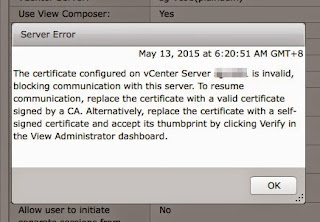
Recently during an outage of my host during to hardware issue in my home lab where my vCenter 6.0 sit on it, resulted some strange behaviour on my View Connection Server 6.1.  I encounter the below error message: When I go to my Horizon View Dashboard, it looks fine. When I try to remove the vCenter entry under the Server options and adding it back I end up with another error when trying to add the View Composer. However this is not related to the strange behaviour above.  But rather this is due to my login did not contain a domain\username but instead of use just username . Back to the strange behaviour.  It seems my connection to my vCenter via Connection Server has a sudden slowness and the certificate seems to be corrupted.  I tried to find a solution to replace the self-signed (in my case) certificate on my View Connection Server however in vain.  I tried removing the vCenter and re-adding it back, that does not help. So I chanced upon some ...