Posts

VMware Horizon View Persona Management Gotcha!

Image
Remember back in the release of VMware View 5.0 (yes the name Horizon wasn't there then), I wrote an article on Deploy Persona Management Overview .  I also helped to answer one question in details here on Persona Management in the communities which now when I read it, I seems to know a lot I have forgotten already (am I aging). While doing a POC I gotten some difficulty in getting Persona Management to work even though policy was applied via Active Directory as well as even tried on the "master" VM used for creating the desktop pool.  Here is a KB on it. This is a screenshot on my customer environment apparently they have a global police in place to use only Local User Profiles so your persona will not work even settings it at domain policy or at local image policy.  I log into one of the View Desktop and run rsop.msc (you would need administrator rights), to see what policy is applied in the domain.  Some domain might take a bit of time up to 10mins to see t...
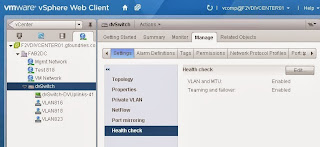
vSphere Network Health Check Saves The Day!

Image
Was doing a Proof of Concept for Horizon View at one customer with a partner.  The infrastructure was setup and network trunked on the uplinks. We started out deploying all the components leveraging on customer's Active Directory, DHCP server and as well as Database. All was well and setup but two things was encountered: Every Desktop pools will always have some desktops not getting IP address. Horizon View client receive connection error after choosing a desktop or while using a desktop. Spend a bit of time troubleshooting by the partner.  Things like using a Windows DHCP instead of Linux (customer's was linux DHCP) and putting Horizon View Connection Server in the same subnet as the Desktops. I took over to see what have gone wrong since my partner has already done so many work.  Did some tests with my colleague, Wei Chiang who is strong in networking.  We managed to isolate the issue and even set static IP on those Desktops that does not have IP howeve...

VMware Certifications Promotion 2013

Image
After the big event, VMworld 2013 at San Francisco and the coming Bacelona, there will be various events to carry on the information that was announced at the APAC regional vForum or VMware Solutions Symposium at individual APAC countries. Other than the announcements and launches of new version and products, there is also promotion for certifications announced here . I am going to take Singapore for example here where vForum 2013 will be held on 24th Oct where information of all the events are shown here . For Singapore, you will be able to take the certification exams like the new associates exams with 50% off the price and as well as VCP and VCAP exams at 75% off the price as shown here .  One thing as a reminder, if you are taking exams that need authorization, you will still need to go through this process which I posted here . The information on this page is rather confusing so here I am going to make a summary for easy understanding. Exams can be taken from 11th N...

What's New vSphere 5.5 in a Summary

With the announcement from VMWorld 2013, vSphere 5.5 was launched.  In case you have forgotten or need to review a summary what vSphere 4.1 and 5.0 and 5.1 has, you can refer to my previous post here and here . VMware has also release a whitepaper on the platform here .  There is also a blog post from VMware as well with a quick reference guide and a summary post here . I will not mention again what is already mentioned above in post referred to.  But I will just briefly goes through some of the things I find it worth mentioning. SSO installation and setup is now a breeze of the past.  It has been greatly improved.  I will do my best to do a video on upgrading and as well as installing for new field once I gather some time and you can see my current video on installing SSO in vSphere 5.1 to do that comparison. Web Client now support MAC OS X for virtual machine console viewing.  I needed this as I am always on a Mac. For environment that want h...

VMware Solutions Walkthrough

So its after the VMworld 2013 in US.  Many of us might be curious of some of the new features and solutions that was announced. Hearing them why not seeing it and know how each feature or function can or configured for technical guys like myself. So here is a gimpse of it and this have not been possible from the technical guys in VMware.  Lots of effort been put through to get this simple to understand. vSOM (vSphere with Operations Management) From setting up ESXi servers all the way to doing some advanced setting as well as the vC Ops Standard vApp.  Not forgeting vSphere replication as well. vCloud Suite 5.5 Here you will see VMware Data Protection 5.5, the new AppHA, the flash cache feature and of course not forgetting vCloud Director itself.  VSAN The Virtual SAN product.  This is what many are looking into especially for the storage guys.  This is release a Public Beta Release which means its not available for purchase or download. ...

New VMware Associate Level Certification

Image
During VMworld 2013, other than the announcement of solutions, there was also a new certification announcement.  That is a new entry certification also known as Associate which was mentioned here . For Data Center virtualization, we will have VCA_DV, for Cloud, VCA-Cloud and lastly for EUC, VCA-WM (a new term Workforce Mobility, which I think might replace the current name DT). For a start, VMware has a promotion code for a 50% discount stated here .  The advantage of having an Associate certification, allows professional to have a easy head start without any prerequisites to take their first step towards VMware certification.  The cost of the exam is roughly about USD130 (SGD160 for me).  From now to end of the year 2013, when you book the associate exam, you will automatically receive 50% discount. Some may not require to attend a course due to their scope of work but a recognition of their understanding of the technology.  With this, not only one doe...

VMware Certification can be verified, Now you cannot lie!

Image
With the recent revamped of VMware Certification site which I mentioned in my prior post , you may also see there are other enhancements in individual certification transcript. Thanks to Choon Kok who brought this up in the VMware User Group - ASEAN . By logging into the certification site , and choosing myTranscript to view all your certificates. You will then see all your certifications that you hold to date. For each certification, you will also see View and Share . View - Let's you download a PDF of your certification.  The link is the same link as the provided in the Share popup window (Weird.  Either one of this link become redundant.  I do not see the need to provide a certificate to other if they can verify you from Share). Share - Provide a link to others who need to make sure you are claimed who you are whether you hold a valid certification.  In here there are two options, one which is as above like View but the link has been cop...