Posts

What So New in vSphere 6?

With the announcement and also from the datasheet , it seems to be pretty lots of functionalities been added.  However there are some critical ones that are more appealing and wanting to see approvement or resolution to those who are already using since vSphere 4 and prior till today which are not make known to many. Storage There were many discussion over storage UNMAP via thin provisioning and many called it a "myth".  This was also discussed heavily in our Facebook VMUG - ASEAN group.  This was due to many changes since VMFS3 to till VMFS5.  Cody wrote a long history of what are the changes for those who have missed out here . A KB was also release and this create some discussion VMFS3 with different block size would benefit thin provision so to speak before vSphere 5.0 Update 1.  Sadly after which, all UNMAP was not possible via GUI or automatically other than via command line or script. I try to ask internally as well and luckily Cormac with his f...

vNUMA Improvement in vSphere 6

Image
NUMA is always a very interesting topic when in design and operation in virtualization space.  We need to understand it so we can size a proper VM more effectively and efficiently for application to perform at its optimum. To understand what is NUMA and how it works, a very good article to read will be from here .  Mathias has explained this in a very simple terms with good pictures that I do not have to reinvent.  How I wish I have this article back then. Starting from ESX 3.5, NUMA was made aware to ESX servers.  Allowing for memory locality via a NUMA node concept.  This helps address memory locality performance. In vSphere 4.1, wide-VM was introduce this was due to VM been allocating more vCPUs than the physical cores per CPU (larger than a NUMA node).  Check out Frank's post . In vSphere 5.0, vNUMA was introduced to improve the performance of the CPU scheduling having VM to be exposed to the physical NUMA architecture.  Understanding ho...

Applications for Storage or Storage for Applications?

With many new start ups from storage arrays, converged, hyper-converged to software defined storage (SDS), many users starts to have lots of choice to make. Recently encountering many questions on which should they choose and which is better.  However there is no straight answer as there are just too many choices to choose from just like in a supermarket.  In the end, some may choose one that advertise the best and create the best reminder in your mind.  To be truth, you will not buy and replaced the rest, but rather some have a hybrid environment for some reasons which we will go through later. With several asks and questions, I like to give some guideline when deciding.  Here I will do my best to start with no bias towards any technology and this is my personal opinion and may not be the same with others. 1.  Ease of management: A big word often misused by marketing I would say.  Assess it and ask yourself do you have a team to manage different comp...

Orphaned Replica in Horizon View

Image
In my home lab, I do not have any redundancy since it for testing purpose and in such, I encounter a power failure and resulted in my Horizon Connection server to be absent. Upon recovery of powering up again, one of the replica end up lost link with the database.  In my vSphere Web Client, I see a replica (orphaned).  I was able to delete the replica folder but the entry still stay in the vSphere Web Client inventory tree (that applies the same to vSphere Client). By the way I am running Horizon View 6.1 and this solution found in the KB still works. I didn't manage to capture my screenshot and found the below similar.  You will see the same on the web client.  Do note that the name of the replica will look like "replica-d0d123123c-f3j2-... (orphaned)".  Do note the actual name does not contain "(orphaned)".  DO NOT include when using the commands below. source: http://www.vladan.fr The command in the KB states and this was the confusion I h...

vSphere 6.0 Web Client Mark Disk As Flash or HDD

Image
Just some sharing that I chanced upon. This might be most useful for those who are building their demo labs when you try to nested environment or simulate your disk as Flash when it is actually magnetic disk (MD). It is also applicable where your Flash Disk/SSD is detected as a normal MD but you need to mark is as Flash disk or revert it when needed. This is typically very true in a Virtual SAN (VSAN) environment.  When you need for a disk group with a minimum of at least one SSD. If you refer to our KB , you might have to go through a list of commands.  However in vSphere 6.0, the web client has the function to do it via the GUI. Below is a screenshot taken from my home lab.  My ESXi server has a normal SATA disk and a SSD disk.  So upon selecting either of them the icon will change to allow you to change it.  Technically you can even build a all Flash VSAN without having to own a VSAN license only different is the read and write ratio remain the same...

vSphere 6 Installation Experience

Image
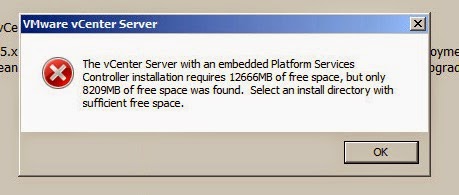
Previously I posted on my installation and upgrade of my vSphere 5.5 here .  Since each upgrade comes about a year or two that I perform, we ought to forget some important things.  So here is my experience. Before you start, head to the vSphere Upgrade Center .  Here you will find all the resources needed.  There is also a simple install walkthrough to guide you through with screenshots! 1) Read the documents on the requirements!  During the installation the vCenter requires at least 17GB of space to store the MSI and part of it the new Platform Service Controller (PSC) takes up 8GB install in the C:\ProgramData path.  Go through the requirements in the product documentation page . 2) Your DSN user in SQL for vCenter (vpxuser), needs to have additional rights for installation and upgrade but not during operations time. Grant this rights back.  In vCenter 6 installation, it points out the additional rights required.  This is great!  ...

VMware VCP6-DCV Certification is now available!

The wait is over.  With the announcement of vSphere 6 in Feb 2015, to the General Availability in Mar 2015, today marks the day where the certification becomes available.  This is one of the fastest release over a major version release I seen since VI3.5. Read about it here .  You can also find out the requirement to be certified VCP6-DCV.  There is also extension to re-certify your VCP and discount for existing VCP on VCP6-DCV as announced here . In previous article , for new comers, you will have to take up the 5 days course, if you have attended a vSphere 5 training course but not taken an exam, you can proceed to next step.  Next step is to pass the foundations exam (75 questions in 90 minutes for USD50) and the VCP6-DCV (100 questions in 120 minutes for USD50) exam.  All exams requires application for authorization. For existing VCP5-DCV, course is recommended but not required.  You can go straight to VCP6-DCV Delta (75 question in 90 minut...